Time blocking, without the spreadsheet feeling

    Give every task a time, and your day an end.

    Time blocking works because a task with a time actually happens. Flowsstate puts your tasks on a timeline beside your meetings, fills the gaps for you when you want it to, and keeps the whole day inside the hours you set.

    Start free Free plan, no card.
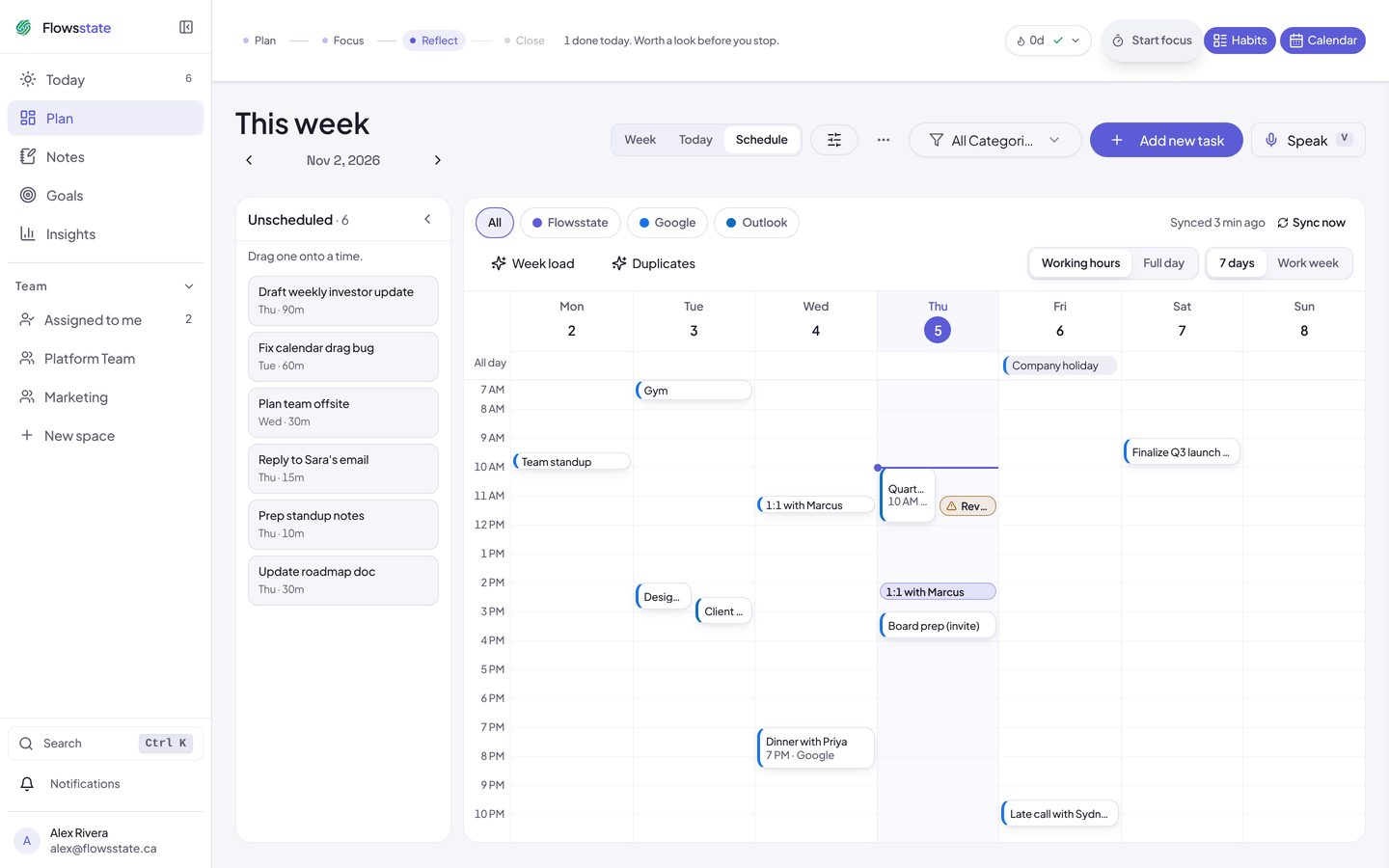
    Flowsstate Schedule: a week of tasks and meetings on a timelineFlowsstate Schedule: a week of tasks and meetings on a timeline
    Plan → Schedule: tasks and meetings side by side, with your stop time drawn on every day.
    • Drag tasks onto the timeline

      Unscheduled tasks sit above the day. Drag one onto a time and it's blocked; drag it again to move it. Click any block to edit it.

    • Auto-plan fills the gaps

      One button places your open tasks into the free time you have left today, around meetings, with a short breath between blocks.

    • A stop time that means it

      You set when your day ends. Nothing is planned past it: anything that doesn't fit is left for tomorrow instead of crammed into your evening.

    • Your calendar beside your tasks

      Connect Google Calendar (Pro) and meetings appear on the same timeline, so the blocks you plan never collide with the ones you've been booked into.


    Plan. Focus. Then stop.

    The whole day in three moves, recorded in the real app.

    A realistic day, not a wish list

    Drop tasks on the week. Flowsstate tells you when a day is already full.

    One thing, with the timer running

    Start a focus session on the task in front of you. Everything else waits.

    Close the day on purpose

    A two-minute shutdown: what got done, what moves to tomorrow, then you're off.

    Drop tasks on the week. Flowsstate tells you when a day is already full.

    Start a focus session on the task in front of you. Everything else waits.

    A two-minute shutdown: what got done, what moves to tomorrow, then you're off.

    Common questions

    What is time blocking?

    Time blocking means giving each task a specific slot on your calendar instead of keeping it on an open-ended list. The slot is a commitment: when it arrives you work on that one thing. It works because it forces a realistic decision about what fits in a day, and it makes the trade-offs visible before the day starts.

    How do I start time blocking?

    Start with tomorrow only. List the three to five things that matter, estimate each one, and place them into the free time between your meetings, biggest first and earliest in the day. Leave gaps, because things overrun. At the end of the day, move what didn't happen rather than deleting it, and plan the next day the same way.

    Is Flowsstate a free time blocking app?

    Yes, Flowsstate is free to start. The timeline, drag-to-schedule, Auto-plan, focus sessions and the end-of-day shutdown are part of the free plan. Two-way Google Calendar sync is part of Pro.

    Does it work with Google Calendar?

    With Pro, Flowsstate connects to Google Calendar in both directions: your meetings appear on the timeline, and tasks you schedule can appear in your calendar. Without it, you can still block your day inside Flowsstate.

    What happens to tasks that don't fit?

    They're kept, not crammed. Anything that can't fit before your stop time stays on your list for later instead of being scheduled into your evening, so the plan you see is one you can actually finish.

    Today can have
    an ending.

    Time blocking is less about a perfect plan and more about deciding what today is for. Flowsstate keeps that decision small and finishable, then tells you when you're done. Free to start: plan your first day in about a minute.

    Start free

    Free plan, no card. About 30 seconds.