A planner that forgives a bad day

    A daily planner that doesn't punish you for a bad day.

    Flowsstate shows one task at a time, warns you before you plan twelve hours of work into six, and measures the week instead of the day. Missing a day costs nothing. Free to start, no card.

    Start free Free plan, no card.
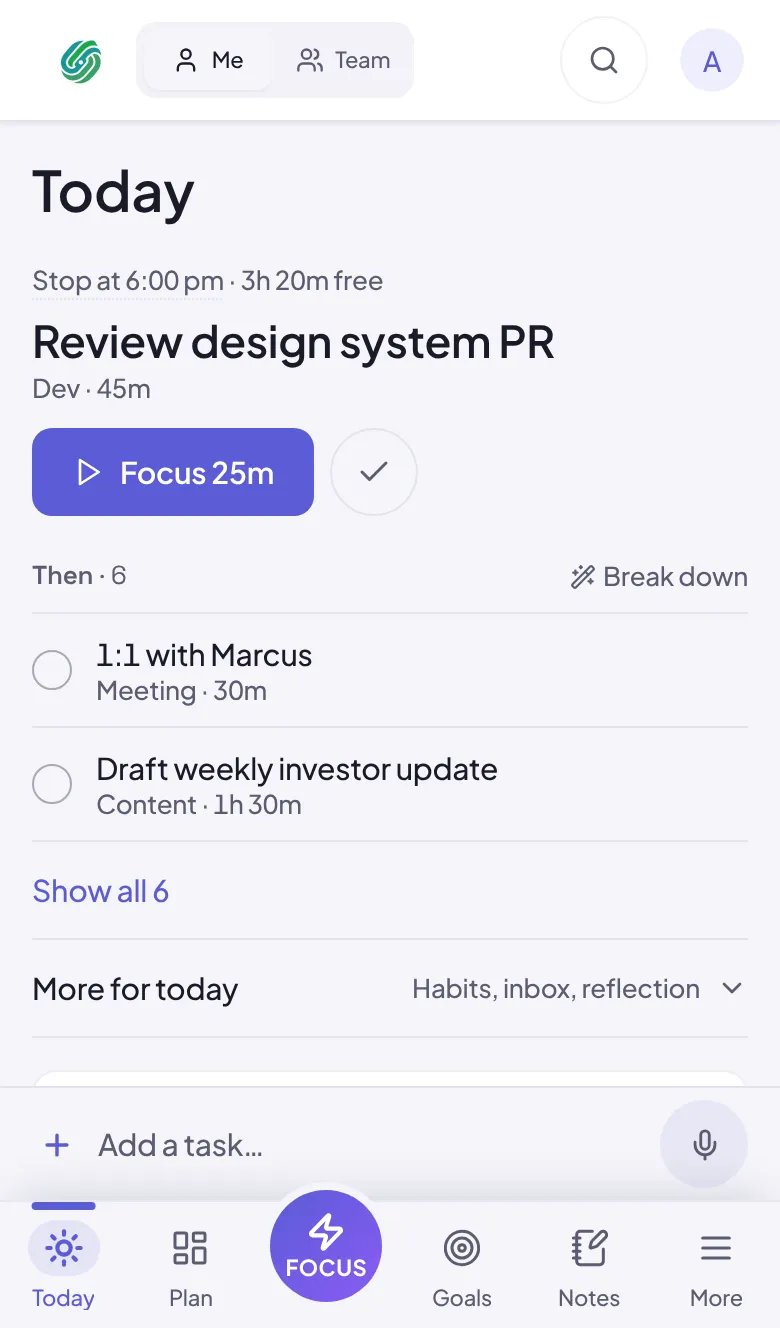
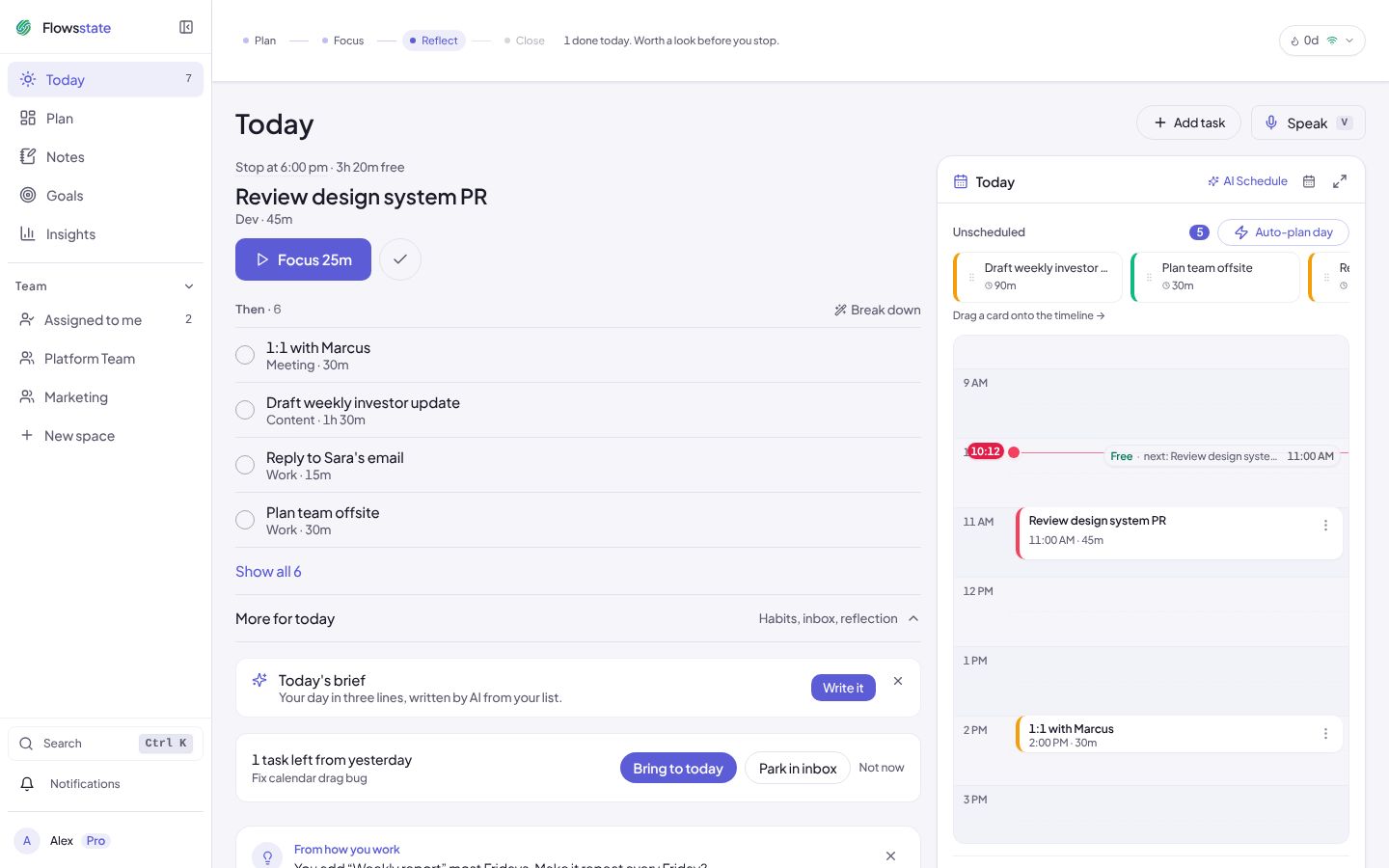
    Flowsstate Today: the next task with a Focus button, the rest of the day's list, and a timeline with a 6 pm stop timeFlowsstate Today: the next task with a Focus button, the rest of the day's list, and a timeline with a 6 pm stop time
    Today in Flowsstate: the plan, then a clear end.

    What is the best daily planner for ADHD without streak shaming?

    Look for a planner that shows one task at a time, warns before you overload the day, and measures progress over a week instead of punishing a missed day. Flowsstate does all three, and its free plan includes the focus timer, the shutdown ritual and the weekly Flow Score.

    Common planner problems and what Flowsstate does instead
    What often goes wrongWhat Flowsstate does instead
    A long list, and no idea where to startThe focus timer shows one task and a timer, nothing else
    Planning twelve hours of work into sixIt warns when the day holds more than fits before your stop time
    One missed day breaks a streak and the app feels ruinedMissing a day costs nothing; progress is the weekly Flow Score
    No clear point where the day is doneA short shutdown ritual closes the day and picks tomorrow's first task
    Setup takes longer than the workNo databases or templates to build: add tasks and plan the day

    Why do streak-based apps feel bad when you have ADHD?

    Many people with ADHD describe uneven days as normal: a great Monday, a lost Tuesday. A daily streak turns that one off day into a visible failure, and seeing it can make it harder to open the app again. A weekly measure lets a bad Tuesday be one day, not a reset.

    • Habits in Flowsstate keep a streak, but missing a day takes nothing away
    • Nothing turns red, and the app never scolds you for a gap
    • The Flow Score looks at the whole week: what you finished, how long you focused, whether habits held

    How does a single-task focus timer help you start?

    It removes the choice. You pick one task, start the timer, and the screen shows only that task and the time left, with optional ambient sound. There is no list to scan while you work, so starting takes one decision instead of twenty. It is free on every plan.

    How do I stop over-scheduling my day?

    Set a stop time first, then plan only what fits before it. Flowsstate adds up your task estimates and meetings and tells you when the day is over by a number of minutes, so you can cut the plan in the morning instead of feeling behind all evening.

    Planning with and without a stop time
    Without a stop timeWith a stop time
    The listWhatever you thought ofWhat fits
    The end of the dayWhen you're exhaustedA time you chose
    Unfinished workFeels like failureWas moved on purpose

    Try it without an account: does today's list fit? (free calculator)

    Is Flowsstate free?

    Yes. The Free plan costs CA$0, needs no card and doesn't expire. Pro is CA$2.99 a month or CA$19.99 a year, in Canadian dollars, and new accounts get 7 days of Pro without a card. You can cancel in one click and export your data any time.

    • One thing on screen

      Focus mode shows the task you picked and a timer. Ambient sound is there if it helps you settle; the rest of the list waits.

    • A day that fits

      You set a stop time. When the plan holds more than fits before it, Flowsstate says so in the morning, while there is still time to cut.

    • Weeks, not streaks

      Progress is a weekly Flow Score. A lost day is one day, and nothing in the app is built to make you feel bad about it.

    • A clear ending

      The shutdown ritual gives every open task a place and picks tomorrow's first step, so you can stop thinking about work tonight.


    Plan. Focus. Then stop.

    The whole day in three moves, recorded in the real app.

    A realistic day, not a wish list

    Drop tasks on the week. Flowsstate tells you when a day is already full.

    One thing, with the timer running

    Start a focus session on the task in front of you. Everything else waits.

    Close the day on purpose

    A two-minute shutdown: what got done, what moves to tomorrow, then you're off.

    Drop tasks on the week. Flowsstate tells you when a day is already full.

    Start a focus session on the task in front of you. Everything else waits.

    A two-minute shutdown: what got done, what moves to tomorrow, then you're off.

    Common questions

    Is Flowsstate made for ADHD?

    It's made for anyone who overloads their day or feels worse after using a productivity app. Many of its design choices, like one task on screen, a weekly score and a clear stop, remove pressure that many people with ADHD describe. It is a planner, not a treatment.

    Does Flowsstate have streaks?

    Habits show a streak, but missing a day doesn't take anything away and the app never scolds you for it. Overall progress is a weekly Flow Score, so one off day is just one day.

    Can it tell me when to stop working?

    Yes. You set a stop time; the app warns when the plan won't fit before it, says when you've done enough, and closes the day with a short shutdown ritual.

    Does it work on my phone?

    Yes. It runs in the browser and installs on iOS and Android from there, and there are desktop apps for Windows and macOS.

    Is my data private?

    The privacy policy is written to align with Canada's PIPEDA. You can export everything as JSON on any plan, and cancelling Pro is one click.

    Flowsstate is a planning app. It is not a medical device and does not diagnose or treat ADHD. If ADHD is affecting your work or your health, talk to a doctor or another qualified professional.

    Today can have
    an ending.

    Flowsstate is for people who plan more than a day can hold and feel worse for it. It keeps the day small enough to finish, one task at a time, and tells you when you've done enough. Free to start.

    Start free

    Free plan, no card. About 30 seconds.