Simpler than a blank Notion page

    The Notion alternative for people who just want to get today done.

    Notion can do anything — which is exactly the problem. A blank canvas with infinite databases is a second job to set up and a place work goes to hide. Flowsstate does one thing well: it helps you plan a calm, finishable day, focus on it, and stop when it's done.

    Start free Free plan, no card.
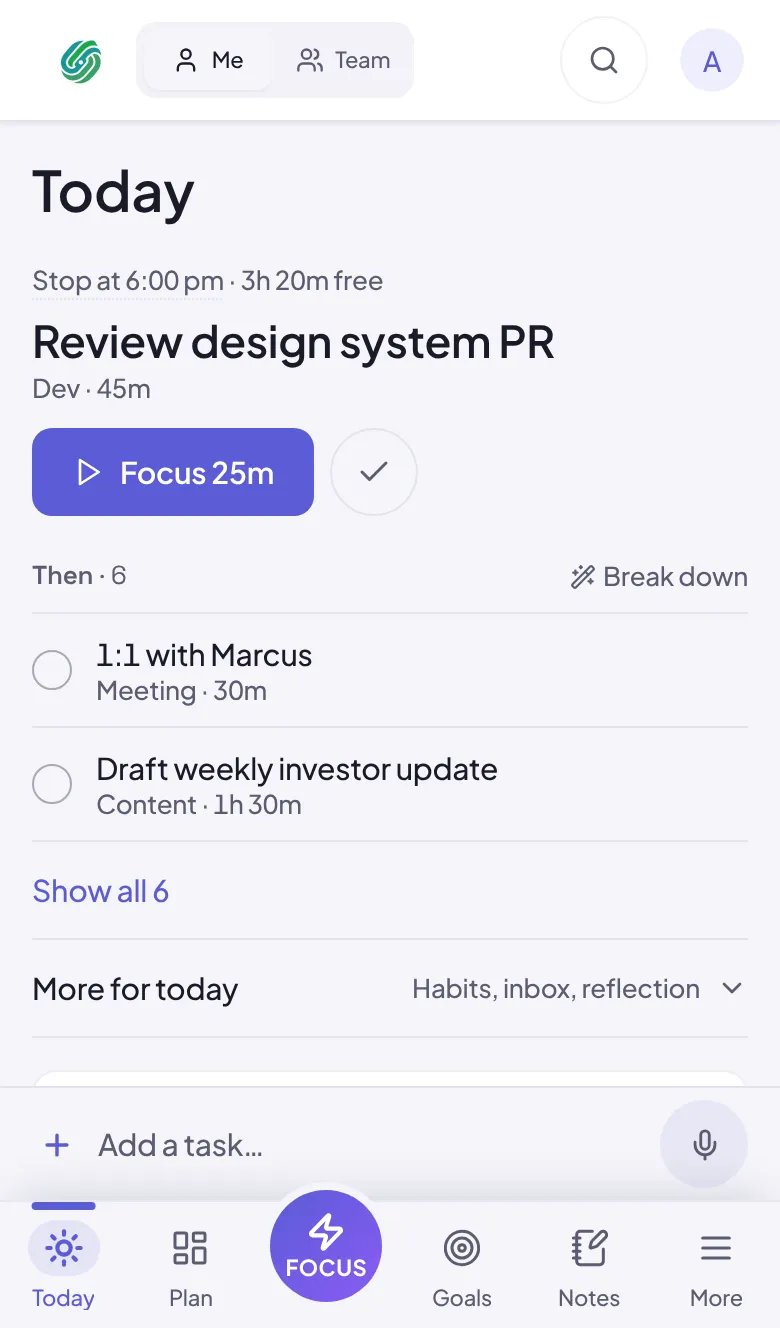
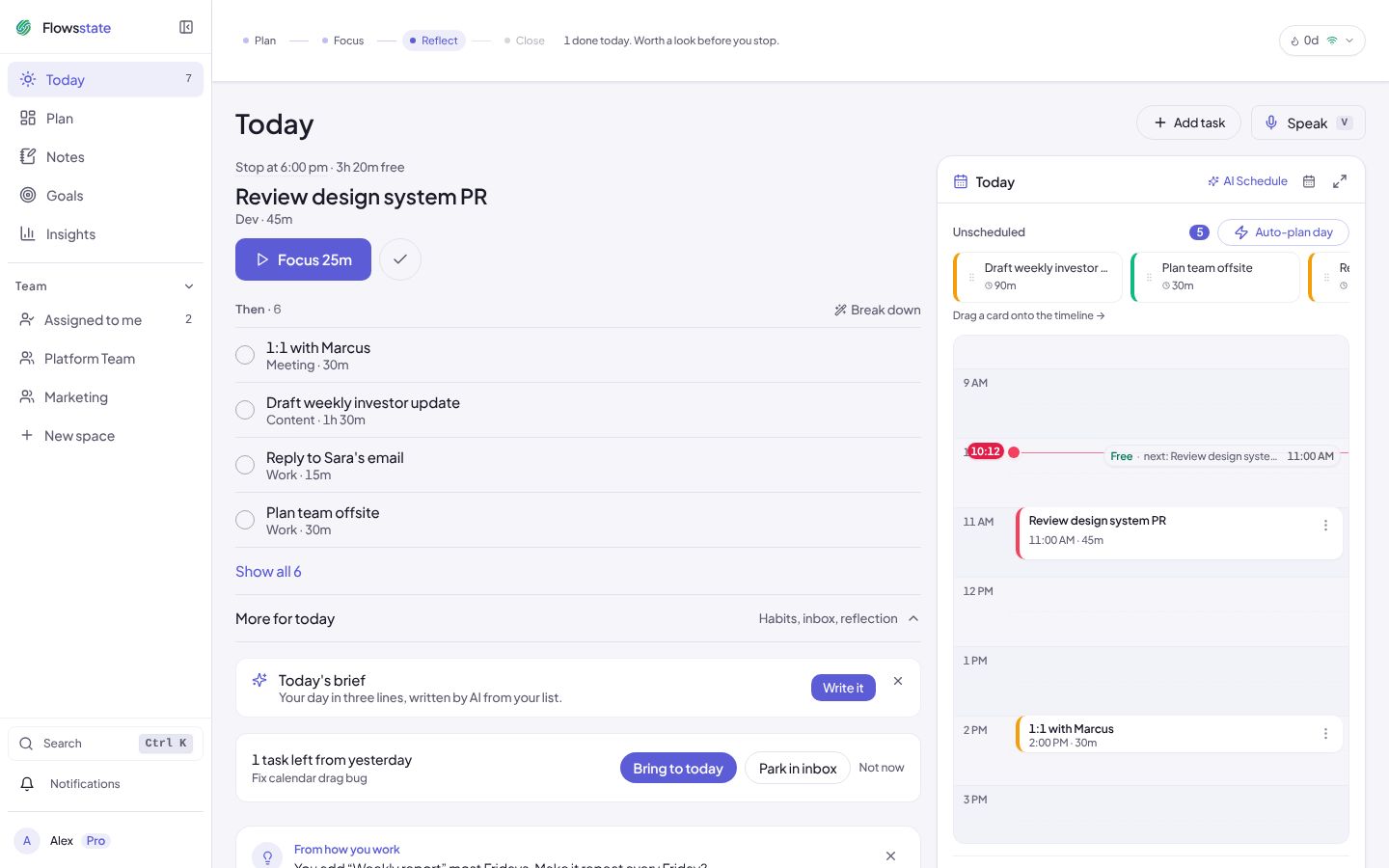
    Flowsstate Today: the next task with a Focus button, the rest of the day's list, and a timeline with a 6 pm stop timeFlowsstate Today: the next task with a Focus button, the rest of the day's list, and a timeline with a 6 pm stop time
    Today in Flowsstate: the plan, then a clear end.
    • Opinionated, not a blank page

      No templates to build, no databases to design. Flowsstate already knows what a good day looks like — you just add your tasks and go.

    • Focused on today, not everything

      Instead of an endless workspace, you get a small daily plan, a focus timer, and a clear finish line. Less to manage means more actually done.

    • Built around relief, not more

      Flowsstate rewards closing your day, not stockpiling tasks. It tells you when you've done enough — a feeling no productivity dashboard gives you.

    • Ready in a minute, free to start

      Sign up (one tap with Google), add a few tasks, and you're planning. No week-long setup before you get any value.


    Flowsstate and Notion, side by side

    Notion is a general workspace and Flowsstate is a daily planner, so this is a narrow comparison. The table shows only what Notion's own pricing page states; where it doesn't say, the cell links to it.

    Flowsstate compared with Notion Plus
    Flowsstate (CAD)Notion Plus
    Monthly priceCA$2.99 a month, billed monthlySee their pricing →
    Yearly priceCA$19.99 a year (about CA$1.67 a month)US$10 a month, billed yearly
    Free plan offeredYes, permanentYes
    Free trial7 days of Pro for new accounts, no cardSee their pricing →
    PlatformsWeb, iOS and Android (from the browser), Windows, macOSSee their pricing →

    Prices checked on 2026-11-17 from each company's own pricing page: Notion.

    Prices and features as published by each company on the date shown. We make Flowsstate, so read this as our view; check their site before you decide. Flowsstate's prices are in Canadian dollars (CA$) and each company's own are in the currency its page shows; none are converted.

    Where Notion is the better choice

    Notion is the better choice if you want a place for documents, wikis and databases, and not only a daily plan. In their own words: “Databases including subtasks, dependencies, custom properties and more” (Notion).

    Plan. Focus. Then stop.

    The whole day in three moves, recorded in the real app.

    A realistic day, not a wish list

    Drop tasks on the week. Flowsstate tells you when a day is already full.

    One thing, with the timer running

    Start a focus session on the task in front of you. Everything else waits.

    Close the day on purpose

    A two-minute shutdown: what got done, what moves to tomorrow, then you're off.

    Drop tasks on the week. Flowsstate tells you when a day is already full.

    Start a focus session on the task in front of you. Everything else waits.

    A two-minute shutdown: what got done, what moves to tomorrow, then you're off.

    Common questions

    What's a good Notion alternative if Notion feels overwhelming?

    If Notion feels overwhelming, the problem usually isn't Notion — it's that a blank canvas asks you to design a system before you can use one. Flowsstate is the opposite trade: it's opinionated, so there are no templates to build or databases to design. You add today's tasks and start working, and your first plan takes under a minute.

    Can Flowsstate replace Notion?

    It depends on what you use Notion for. Flowsstate is not a wiki or a document workspace, so if you rely on Notion for long-form notes, nested pages or a team knowledge base, it isn't a replacement. If you mainly use Notion as a task and daily-planning system and find yourself reorganizing more than working, Flowsstate covers that directly and with far less setup.

    Do I have to build templates or databases to get started?

    No. There is nothing to configure before you get value — no template gallery, no database schemas, no properties to define. Flowsstate already has an opinion about what a good day looks like, so setup is signing in and adding a few tasks.

    What does Flowsstate do that Notion doesn't?

    It ends the day. Flowsstate caps your day to a finishable set of priorities and closes it with a shutdown ritual that gives you an explicit signal you've done enough — plus a focus timer and ambient audio for protected work time. A Notion dashboard will happily show you an infinite backlog forever; it has no concept of finished.

    Is Flowsstate free?

    Yes, it's free to start, with one-tap Google sign-in and no credit card. The focus timer, ambient audio, shutdown ritual and Flow Score are part of the free experience.

    Today can have
    an ending.

    If you tried Notion and bounced off the setup, or you keep reorganizing instead of doing the work, Flowsstate is the calmer alternative. It's not more powerful — it's more finishable. Free to start, and your first plan takes under a minute.

    Start free

    Free plan, no card. About 30 seconds.